When to Build vs Buy: AI Agent Strategy for SMBs
By Rick Bucks & Pavel Cursor | June 2026
Eighty percent of your AI automation needs do not need AI.
That is not a typo. It is a finding from CloudGeometry’s analysis of business use cases: the vast majority of what companies want to automate can be solved with simple reactive or scheduled workflows — not complex autonomous agents. A lead capture form triggering a CRM update. An invoice arriving and a payment reminder sending. A support ticket routing to the right queue based on keywords. These are powerful automations. They are not AI agents. And that distinction matters because the wrong choice can cost you six figures and a year of lost momentum.
Small and mid-sized businesses face a genuine dilemma. Buy an off-the-shelf platform and you risk vendor lock-in, limited customization, and scaling costs that surprise you later. Build a custom agent and you risk budget overruns, maintenance nightmares, and an engineering team that is suddenly debugging chatbots instead of building products.
At Content Factory, we believe AI handles scale, humans provide soul. For SMBs, that means matching the complexity of your solution to the complexity of your problem. An AI agent is not always the answer. Sometimes a Zapier workflow is. The trick is knowing which question you are actually asking.
The Real Cost Comparison
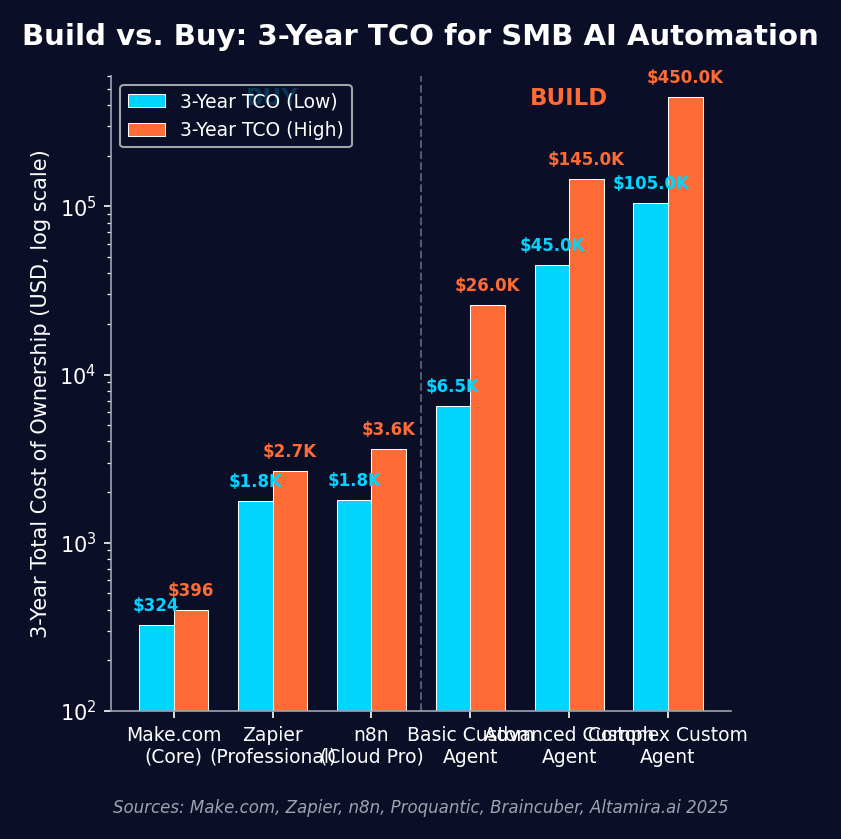
Let us stop talking in abstractions and look at actual numbers.
Buy: Platform Pricing in 2026
Make.com offers a free tier at one thousand credits per month. Their Core plan, the sweet spot for most SMBs, runs roughly nine to eleven dollars per month for ten thousand credits. It is three to five times cheaper per operation than Zapier at similar volumes, with unlimited scenarios on paid plans.
Zapier starts free at one hundred tasks per month. Their Professional plan, where most SMBs land, costs forty-nine to seventy-four dollars per month for two thousand tasks. They offer the largest app ecosystem at over eight thousand integrations, but task-based pricing scales quickly.
n8n is open-source and self-hosted for free with unlimited executions. Their Cloud Pro plan is roughly fifty dollars per month for ten thousand executions. Self-hosting requires fifty to five hundred dollars per month in infrastructure plus DevOps time. The trade-off is maximum flexibility and data privacy control.
Microsoft Copilot Studio runs on a pay-as-you-go model, typically around two hundred dollars per month for moderate use. It is strongest for organizations already deep in the Microsoft 365 ecosystem.
For most SMBs, the three-year total cost of ownership for platform-based automation falls between five thousand and twenty thousand dollars. That includes subscriptions, some premium integrations, and implementation time.
Build: Custom Development Costs
A basic rule-based agent starts at five thousand to twenty thousand dollars upfront, with five hundred to two thousand dollars per year in maintenance, and a one to two month timeline.
An advanced agent with machine learning components runs thirty thousand to one hundred thousand dollars upfront, five thousand to fifteen thousand dollars per year in maintenance, and three to six months to deploy.
A complex agent with API integrations, real-time processing, and cloud infrastructure starts at seventy-five thousand dollars and can exceed three hundred thousand dollars. Maintenance runs ten thousand to fifty thousand dollars per year. Timeline is six to eighteen months.
An enterprise multi-agent system starts at two hundred fifty thousand dollars and can exceed one million dollars, with annual maintenance of fifty thousand to two hundred thousand dollars and a twelve to thirty-six month delivery window.
The upfront cost is only part of the story. A customer service agent handling one hundred thousand monthly conversations can generate eight thousand to twenty-two thousand dollars per month in LLM API costs alone. Third-party integrations add another ten to five hundred dollars per tool per month. A typical sales agent with three to five integrations runs eight hundred to nine hundred dollars monthly before you count infrastructure, hosting, or maintenance.
Time to Value: The Decisive Difference
Platform-based solutions deploy in hours to days, with full deployment in days to two weeks and return on investment in one to four weeks. Custom builds take two to four weeks just to scope, one to two months for basic deployment, and three to six months to show ROI. Advanced builds stretch to three to six months for deployment and six to twelve months for payback.
For SMBs with limited technical staff, the time advantage of buying is often more valuable than the customization advantage of building. Every month your engineering team spends on an internal agent is a month they are not improving your core product, serving customers, or closing revenue.
When Buying Makes Sense
Buy when you are automating standard business processes: lead capture, customer support routing, invoicing, scheduling, email sequences, or data synchronization between SaaS tools. These are solved problems with mature platform solutions.
Buy when speed to value matters more than perfect customization. If you need a working solution this month, not next quarter, platforms win.
Buy when you do not have a dedicated AI or machine learning team. No-code and low-code platforms are designed for operators, not engineers.
Buy when your budget for initial implementation is under ten thousand dollars. Custom builds rarely stay under that threshold once requirements expand.
Buy when you need to test and validate AI value before committing to a major investment. Platforms let you experiment cheaply and pivot fast.
Buy when your integration targets are modern SaaS tools with well-documented APIs. This is where platforms like Zapier and Make.com shine.
When Building Makes Sense
Build when AI is a core differentiator or competitive moat — not just a utility. If your product’s unique value depends on a custom model or proprietary workflow, you cannot buy that off the shelf.
Build when you handle highly sensitive data that requires on-premise or private-cloud deployment. Healthcare, finance, and legal applications often fall into this category.
Build when you need complex multi-system orchestration with legacy systems that lack modern APIs. Platforms connect to APIs. They do not rewrite mainframes.
Build when your business logic is so unique that no platform can accommodate it. If your workflow requires custom calculations, proprietary decision trees, or industry-specific compliance logic, you may need custom code.
Build when regulatory requirements demand full audit control, explainability, and traceability that platforms cannot provide.
Build when your transaction volume is high enough that per-task platform pricing becomes prohibitive. At sufficient scale, fixed infrastructure costs beat variable task pricing.
Build when you have an existing engineering team with spare capacity and real AI or machine learning expertise. A team that has never deployed a model should not start with a production agent.
The Hidden Costs Nobody Talks About
Custom AI agents have costs that do not appear in the initial quote. LLM API token bills scale with usage and can exceed build costs within months. Third-party integration fees compound. Infrastructure and hosting run fifty to two thousand dollars per month depending on scale and compliance requirements. DevOps and security monitoring add ongoing labor costs.
The biggest hidden cost is opportunity cost. Pulling engineers from core product work to build internal tools is a strategic bet, not a tactical decision. For an SMB with a small engineering team, losing two developers to a six-month agent project can stall the entire product roadmap.
Technical debt is another sleeper cost. Custom AI agents require continuous retraining, model updates, and integration maintenance. For SMBs without dedicated DevOps, this becomes a liability that compounds over time. Platforms handle maintenance, updates, and security patching as part of the subscription.
Vendor lock-in is real but manageable. Most platforms allow data export and workflows can often be rebuilt on competing platforms in days. Custom build lock-in is worse. You are dependent on the original developers’ code, documentation, and architecture decisions. If they leave, knowledge leaves with them.
The 5-Question Build vs Buy Decision Framework
Use this checklist before you commit to either path. If the answer to any of the first four questions is no, you should almost certainly buy.
1. Is AI a core differentiator for our business?
If the agent is a utility — something that saves time or reduces manual work — buy it. If it is a competitive advantage that customers will pay for or that defines your product, consider building.
2. Do we have the technical team to build, maintain, and secure this?
Building requires AI or machine learning expertise, software engineering, DevOps, and security knowledge. Maintaining requires all of the above on an ongoing basis. Be honest about whether your team has the skills and the bandwidth.
3. Is our budget realistic for both build and ongoing costs?
The build is just the beginning. Factor in API costs, infrastructure, maintenance, and opportunity cost. If the total three-year cost is not comfortably inside your budget, buy.
4. Can an off-the-shelf platform handle at least eighty percent of what we need?
If the answer is yes, start there. You can always build a custom integration for the remaining twenty percent rather than reinventing the entire stack.
5. Do we need this live within the next thirty days?
If speed matters, buy. Platforms deploy in hours. Custom builds take months. The revenue or efficiency gains from launching sooner often outweigh the benefits of perfect customization.
Platform Comparison: Which Tool Fits Your Team
Make.com is best for power users and complex logic. The visual workflow builder offers granular control over HTTP modules, data transformation, and error handling. It is the cheapest per-operation for high-volume workflows. The learning curve is steeper than Zapier but the flexibility is greater.
Zapier is best for non-technical teams and quick wins. The simplest interface and fastest path to first automation. The largest app ecosystem. Task-based pricing can become expensive at scale, but for straightforward multi-app workflows it is hard to beat.
n8n is best for technical teams wanting control. Open-source with a self-hosted option. Most flexible for custom integrations and data privacy. Self-hosting requires infrastructure expertise. The fair-code license and cloud option make it accessible without sacrificing control.
Microsoft Copilot Studio and Power Automate are best for Microsoft-centric organizations. Deep integration with Office 365, Dynamics, and Azure. Copilot Studio for conversational agents. Power Automate for backend workflow automation.
The Staged Approach: Buy Fast, Build Later
The smartest SMB strategy is rarely pure build or pure buy. It is staged.
Start with a platform to prove value, test assumptions, and learn what you actually need. Most teams discover that their requirements are simpler than they initially assumed. A Zapier workflow that takes a weekend to set up often replaces a six-month custom build that was scoped for a more complex problem.
Once the platform is running, measure results. Track time saved, error rates, user satisfaction, and scaling costs. If the platform hits a hard limit — a missing integration, a volume ceiling, or a customization gap — that is when you scope a custom build.
By then you have data. You know exactly what the platform cannot do. You have a baseline for return on investment. And you have internal proof that the automation is worth the investment. Building with validated requirements is dramatically cheaper and less risky than building on assumptions.
Avoid the AI Agent Complexity Trap
The CloudGeometry AI Agent Complexity Spectrum describes five levels of automation, from simple rule-based workflows to autonomous multi-agent systems. Most SMBs only need levels one and two. Yet many teams scope projects at level four or five because the technology is exciting and the vendor demos are impressive.
A level-one rule-based automation handles a trigger, applies logic, and executes an action. A level-two reactive agent responds to inputs with some decision-making. These solve the vast majority of SMB use cases.
Level-three tool-using agents, level-four proactive agents, and level-five autonomous multi-agent systems are powerful. They are also expensive, complex, and overkill for most small and mid-sized businesses. The teams that fall into the complexity trap end up with sophisticated systems solving simple problems at unnecessary cost.
Match the solution to the problem. If a scheduled workflow does the job, build a scheduled workflow. If a reactive chatbot does the job, build a reactive chatbot. Do not build an autonomous multi-agent orchestration layer for a problem that a fifteen-dollar Zapier task could solve.
Make the Decision Your Budget Can Live With
The build vs buy decision is not a technology choice. It is a business choice. It depends on your budget, your timeline, your team’s skills, your data sensitivity, and your strategic priorities.
For most SMBs, the right answer is to buy first, measure second, and build only where platforms genuinely fail. The cost difference is not marginal. It is often a factor of ten or more. The time difference is measured in months. And the risk difference is the gap between a predictable subscription and a custom project that can overrun budget, timeline, and patience.
Content Factory helps SMBs design AI automation strategies that match complexity to need, evaluate platforms against custom build options, and implement workflows that deliver value fast without unnecessary investment. If you need clarity on whether to build or buy, talk to us.
Content Factory OÜ
AI-native, human-refined content production
https://contentfactory.ltd